
Sandton, Gauteng, South Africa
Monday to Friday
Update250 2022 Marksheet V7
Join us in the TwitterVerse: frontofficeschools@front0ffice
Contents: (click on a content header to go directly to that section)
Term4 Max Mark
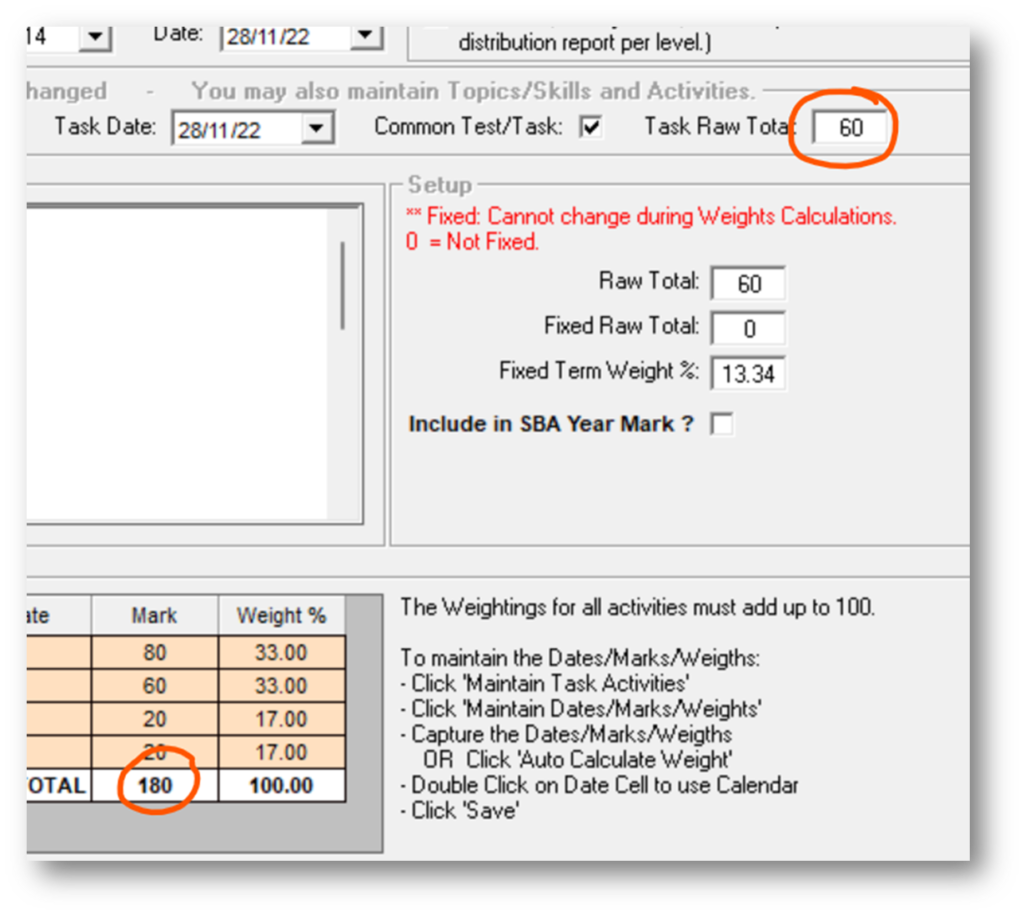
There are scenarios, where the sum of the activites within a task, add up to more (or sometimes even less) than the total of that task. A good example, is Music for grade 10 and 11, where in fact, they have managed to add up to more AND less:

The activities for the PAT task add up to 300 whereas the task is out of 100 and conversely the exams add up to less (150) than the total reflected by the task (200)… I wish my bank account worked like that.
We have released update 250 AND MarksheetV7. MarksheetV7 is not actually pertaining to this issue BUT
- It does fix something else which I will show below AND
- Once you update to 250, it is going to force you to use MarksheetV7 anyway
- This is not going to affect the fact that you have been using MarksheetV6 up til now.
A similar example to above is for isiZulu 2nd Additional Language. There is a task out of 30, which pushes into an activity of another task which is out of 15. The mark is carrying through as the original mark and not converting down:
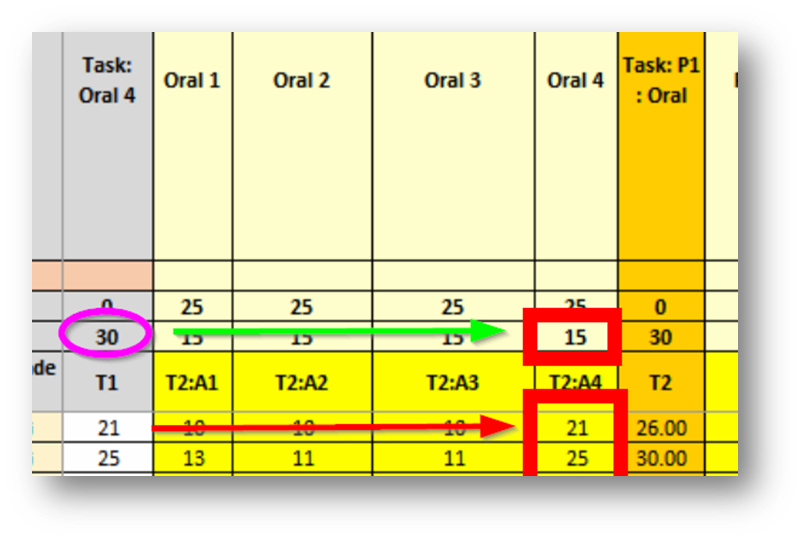
Now actually, this wouldn’t affect SASAMS because it doesn’t fetch that Oral4 activity from the FrontOFFICE Marksheet, it pulls it from the Oral4 task just like above and there it DOES convert it. What it will do though, is affect final mark calculations on the FrontOFFICE marksheet which you may then be using to populate an RD column for your LRCs. Again, this is resolved by running update 250 AND:
- Reproduce your marksheet
- If teachers have been capturing already then they rename the one they have, the grab the new one you have just created, and they copy and paste VALUE ONLY across to the new one, then delete the old one. (if you have already synched to SAMS and sposted to FO then re-split and re-post and re-sync)
Speaking of pasting VALUES please also ensure staff use this when pasting from their ‘own’ marksheets that they may be running into the FrontOFICE marksheets. Sometimes they are copying formula across and not purely numbers.
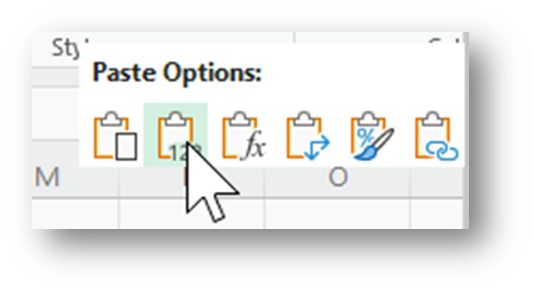
They should also be aware of the fact that when pasting into a column, the macro that validate an entry (eg. to prevent a mark from being greater than the task total) cannot work and so marks that are ‘too big’ can occur.
I have personally now been through about 100 different marksheets for the various subject grades and these are the following marksheets I believe to be affected:
- isiZulu 2nd AddLang Grade 9
- LS Grade R
- Maths Grade R
Some schools may have changed activity totals or indeed added activites theselves and not adjusted the task totals. You would need to know if you have done those and check those subjects.
If you have already run the Split Tasks / Activities button must please do so again and sync to SAMS again.
Grade 10 & 11 marksheet stats
All Grade 10 and 11 marksheets generated using the version prior to 7 have an error in the STATS section resulting in the incorrect calculation of the number of failures.
There is a new FIX Tool available that will repair this error.
MarksheetFix2022-06-FailStats.xlsx. Open it and browse to the folder location of your 10 and 11 grades (doesn’t matter if there are GET marksheets in there) and run the fix.
Speaking of Fixes:
Reminder of -1 (or blank) fix
Please copy the MarksheetFix2022-04-H-SbaPat.xlsb and paste it to your local folder (anywhere) and use that. If you have been using a previous version that is fine, this one is just faster and better (will run through sub folders for example so you don’t have to point it at every folder containing marksheets).
This will turn any red block with a -1 or a blank in it into a pink block and this then tells you that that marksheet is being forced to skip that mark. This gives the teacher an accurate final mark to look at (perhaps they are using the marksheet for comments but either way it is nice to see the final mark) for thoe pupils missing marks, which is why it is run BEFORE issuing the marksheets to staff.
We will be releasing a ‘POST’ fix too which will then run through your term4 tasks/exams/orals/pats/pyjamas (just kidding, not your pyjamas, you can breathe), and do the same thing with the -1s so basically, you can point this fix at your completed folder. It WILL simultaneously go back and do all the others if they weren’t done before.
Split Marksheets
If you split your subjects on your LRCs. Eg SS à Geo/His then you can produce year end split marksheets that calculate your final marks for you for each split. This way you don’t have to export your SAMS final marksheet to excel and sit there working them out.
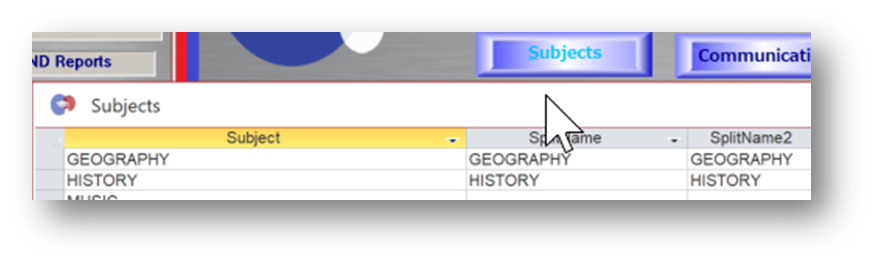
In FrontOFFICE, in your Subjects Button, unhide the columns ‘SplitName’ and ‘SplitName2’ and type the words History and Geography as per the screenshot. This may seem obvious but in other subjects, the task in SASAMS is not named exactly as that (eg Art = Art Form 1 and Drama = Art Form 2). We will assist you in knowing what the names should be.
When you produce your marksheet, it will then look like this:
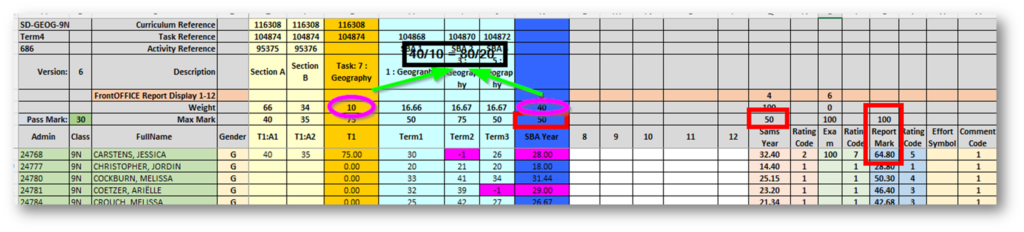
So you can see it ONLY has the one split on it (eg Geo on the Geo teachers marksheet) and the exam component is then 10 of 50 and the SBA 40 of 50 (therefore 20/80 for Exam/SBA). The SBA also shows as a mark out of 50 which represents what part this split contributes to a mark out of 100 for SBA (this can be pulled into an RD in FrontOFFICE and the import routine will convert it to a mark out of 100).
The SBAYear mark ALSO shows as a mark out of 50 to indicate what contribution it will make to the final Social Science mark and an RD above this column will pull it into FrontOFFICE and convert it to a mark out of 100 in the process. The report Mark represents the SAMSYear mark as a mark out of 100 so you can see what the mark will be in FrontOFFICE (you could in fact, put the RD above the Report Mark column, it will do exactly the same thing as putting it above the SAMSYear column),
If you have already produced your marksheets the old way, that is fine, we can still use the new marksheets to calculate your final marks for each split for you and pull the RDs into FrontOFFICE, just let us know and we will jump online with you and show you how to do this.
We can also create non-conventional splits for instance NS split into Life Science and Physics in SASAMS which therefore means that marksheets can be produced for that split too. Other examples include LO split into PE and Guidance, Tech split into a myriad of different types of Tech in different schools.
Basically, there is absolutely no need to pull marks for any term from SASAMS into FrontOFFICE and so there is no need to have SASAMS on all machines for staff to capture into (no installing on new macines, no reinstalling, no patching all machines, no troubleshooting etc). Plus, your excel marksheets can be stored in the cloud (Sharepoint, Dropbox, Google cloud etc) and then accessed on any device or platform and so accessible from anywhere. If you are on MS365 then using Sharepoint is perfect for this.
Recent Comments