
Sandton, Gauteng, South Africa
Monday to Friday
FrontOFFICE Result Calculation + Circular 28 and 69 of 2023
Contents of this email:
- KZN CIRCULAR NO. 28 OF 2023 – IMPLEMENMTATION OF MICROSOFT SCHOOLS’ AGREEMENT FOR PUBLIC SCHOOLS.pdf
- PD Circular No. 69_2023.pdf
- POPIA NSC
- FrontSMS New Suppliers
Circular S8 of 2018.pdf
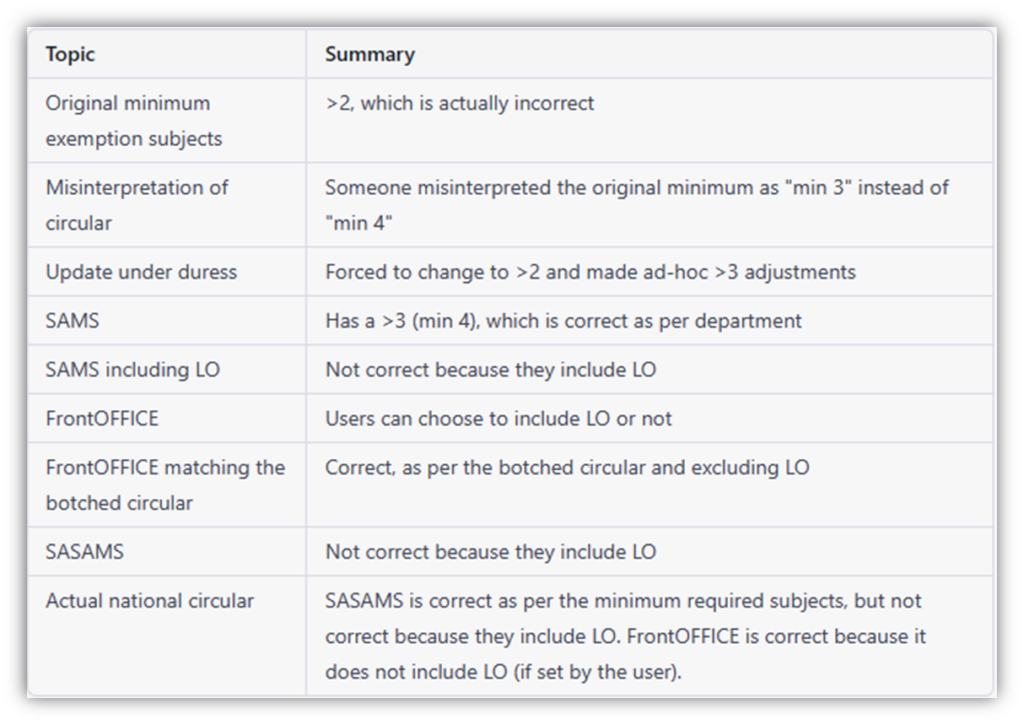
So, something has come to our attention with regards to the end of the year result in terms of Bach, dip, HC passes etc. for FET. A school pulled up an SASAMS schedule and a FrontOFFICE schedule and found a discrepancy between the two. Ironically, they are both wrong although some folks would still have been on a ‘path’, depending on their interpretation, that ultimately made the FrontOFFICE one correct. Below is a written summary, a tabled summary and a diagram of our investigations.
- FrontOFFICE originally had min of 4 exemption subjects (ie. >3), which is actually correct but someone sent out a mis-interpretation of this breakdown in a circular (and i can tell you that 100% the person that drew up that circular had been told ‘greater’ than 3 (ie. min 4) but did not understand the difference between ‘greater than’ and ‘greater than and equal to’, and has therefore put down ‘min 3’ (>=3)).
- under duress/pressure (as some districts in KZN circulated this – but not all) I was forced to change it in an update (to >=3) by those district inspectors standing over ‘your/our’ shoulder, insisting that the ‘botched/incorrect’ circular was correct. We then did add-hoc adjustments of FrontOFFICEs for those that were still following the correct circular (ie. >3 = min 4 exem subjects).
- On the SAMS side, the result calc already had a >3 (ie. min 4) which is correct, as per dept. so that would have accounted for the discrepancy that was picked up, which, if you were following the ‘incorrect’ circular, would have been correct on the FrontOFFICE side and not SASAMS.
- BUT it gets more squirly than that, in that SASAMS is actually NOT correct because they are including LO.
- FrontOFFICE users can choose to include LO or not (or any subject for that matter), so from that perspective, we were correct. Unless users chose to also include LO. In which case, technically speaking, they were incorrect on two accounts (ie >=3 AND including LO) but that is one’s interpretation and therefore up to one (said the queen).
- so whilst we did not match SASAMS, FrontOFFICE was actually, as per the ‘incorrect’ circular along with the setting to exclude LO, therefore ‘correct’ and it was SASAMS that was incorrect. Of course, as per the actual national circular (and corroborated by university requirements), it was SASAMS that was correct as per the minimum required subjects but not correct because they included LO and FrontOFFICE that was correct because it did not include LO (if set by the user). Confused yet?
Let’s try a tabular summary:
It might be easier for you to see as a diagram:
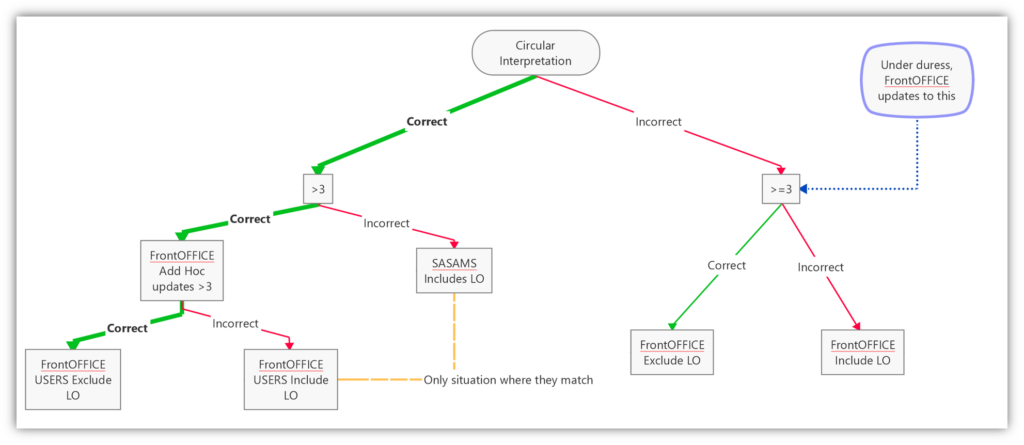
Basically, the only ultimate correct path to match the national circular for this, is via FrontOFFICE (the thick green line) because whilst SASAMS DOES have the correct interpretation of the min number of Exemption subjects, it has incorrectly included LO as an Exemption subject (unless you are a user, that has actually decided that LO IS an exemption subject, there are some, which is why it is a user setting in FrontOFFICE).
Similarly, the only path to TOTALLY incorrect (ie. >=3 AND LO included), is also via FrontOFFICE…. victim of our own success as it were.. having said that, it would have been a schools’ interpretation that lead them to that point and so as far as they are concerned, it would be correct BUT STILL not match SASAMS. At that point they may well have printed an SASAMS set of results and seen they did not match and decided that the FrontOFFICE results were incorrect (which they may or may not be, depending on whether they had the ad-hoc update to >3 AS WELL AS excluded LO) but in actual fact the SASAMS result calcs are wrong.
The only situation where SASAMS and FrontOFFICE match, is if their FrontOFFICE Result Query version was set to >3 (min 4) exemption subjects, which is technically correct, and FrontOFFICE was set to Include LO (same as SASAMS which doesn’t have a user setting, it just defaults to this), which is technically incorrect. Neither system in that instance, is correct (although FrontOFFICE has a user setting to resolve that).
The long and the short of this is that we are updating all FrontOFFICE Result Queries to >3 (min 4) exemption subjects. In the Subjects table, the Exemption column for LO should be blank (ie. NOT have an ‘E’ in it because that is for subjects that are included in exemption).
If you still believe that the min number of ‘E’ subjects is 3 and can get official (and current) confirmation of this from the dept, then we will do an add-hoc update for your Result Queries, HOWEVER:
To note, document Circular S8 of 2018.pdf in the FrontOFFICE\Department\2023 folder denotes quite simply that for a Bachelor pass:
- Minimum of 30% in LOLT
- Minimum of any 4 “official” (20-Credit bearing) subjects at 50%
- LO is not included in this
If there is a more recent circular than this that is contrary to this AND can be verified as national directive (and not local misinterpretation) then we will update accordingly.
KZN CIRCULAR NO. 28 OF 2023 – IMPLEMENMTATION OF MICROSOFT SCHOOLS’ AGREEMENT FOR PUBLIC SCHOOLS.pdf
I have posted this below on FB directly too.
SOMETHING VERY URGENT TO BE ADDRESSED:
You would have noticed a circular from the department regarding obtaining MS365 license via the department (screenshot below). It is strongly advised that you do this through us.
If you do it through the department the bottom line is you will loose a huge amount of autonomy and control:
- you will be on the department email domain (eg: @kznschools.gov.za as opposed to for example @HilltopHigh.co.za)
- You will not get your own Sharepoint on which to create your own sub sites (eg: Afrikaans dept, Maths Dept, etc), They will simply have subsites that your whole school will be based on. These sharepoint subsites will become critical for cloud access of FrontOFFICE Data.
- Along with this you will get limitations in respect of the range of applications and services as this is under a regional license as opposed to a single license (which is still free).
- There will be a major lack of administrative control in respect of user access levels and profile controls etc.
- With your own MS365 account you have the ability to control your entire network domain with Azure Active Directory and other awesome possibilities on Azure which you will not have access too. If you wanted to automate your Windows profiles as per your users (automatically populated by FrontOFFICE) you would not have access to this and rely on the dept. to set this up for you.
- That leads in to the area of control that one can have in terms of BYOD (Bring Your Own Device) in respect of learners and or staff having their own devices on the network. Again, you would be relying on the dept. for this.
- And lastly (but not absolutely ‘leastly’), your service, backup and support will be via the department (or subsidiary) vs FrontOFFICE’s backup and service (I mean is this even a contest as this point)
To ensure that you get the best version of the MS365 Education Tenant offered free to education institutions, it is 100% in your best interests to do it through us. We are Microsoft experts and have always been mainstay players in this space. This is a large reason why FrontOFFICE can offer such a complete range of solutions to our clients at fraction of the cost of others on the market.
By the way, this also applies to our SASAMS only schools, we can help you with this too.
I’ll emphasise this point again: You will not be able to do the digital conversion (FrontOFFICE to MSTeams) if you go through the department.
I would urge you to send the following links to your academic heads and little examples of what you would NOT have access to if your acquire your MS365 license through the department and not directly for your own school.
- How to use Reading Progress and Reading Coach in Microsoft Teams (20m47s)
- This is built in the MSTeams and whilst in this particular example, is targeted for young learners in reading, it can also be applied to more advanced levels.
- Take note of the data analytics (Data! Data! Data!). The more you know, the more you can plan for, the more you can improve performance.
- Introducing Teams Classwork: The One-Stop-Shop for Managing your Class Resources (document)
- This is a curricula management app pin Teams for Education coming in June! Watch this space.
- Classwork is a one-stop shop to create and organise class resources, including assignments, OneNote class Notebook pages, web links, files and Teams channels.
- This could be managed at academic head level (obviously with collaboration across the department) and distributed to the classes/Teams (and channels within those eg Topics within the subjects etc).
- Create auto-graded assignments in Microsoft Teams with BookWidgets (1hour webinar)
- Ok so this one is quite in-depth so obviously lengthier but is an example of addon teaching and learning tools that can be added to this environment.
- Auto-graded assignments leaves teachers with more time to analyse the results and analytical data (also auto-generated) and the areas of weakness and strength that need attention/reinforcement.
- Consistency in design templates and styles across departments.
- Allows for extremely high degree of design creativity and flexibility whilst also having the benefit of the analytics and data that comes with that.
If a teachers resources are all held (and built) in their digital repository then this also makes continuity far easier for a replacement teacher (whether temporary or permanent) as they can simply pick up where left off and all the resources and assignments would be immediately available by simply allocating that staff member to that class in set classed in FrontOFFICE and running the MS365 Data sync (much like using the Batch Reallocation function for set classes when learners move classes).
Similarly, this would be the same for a learner changing subject in FET, they would be reallocated via FrontOFFICE synching to MS365 and the materials issued in the course so far would be immediately available on their MSTeams profile.
One has to begin seriously asking the question of ‘is paper is even necessary anymore?’. I know that many years ago it was touted, but never realistic, however the timing wasn’t right. It is now!
You might even be able to take it as far as a teacher moving and the learners staying where they (in the high schools) given that all they would need is their laptop/tablet, which saves a huge amount of time in between classes. I am personally able to go anywhere and work with nothing more than my laptop and my phone. My screen is a touch screen so I never have to work with paper (well extremely rarely), I literally can never find a pen because I never use one (and my daughter nicks it from me if I do)). It’s becoming totally possible! Just to make this clear, ALL of your FrontOFFICE’s have been updated with this functionality already!! (Including SAMS2Front schools). If you are already on MS365, which a number of you are, all you need to do is engage with us and we can train you on the few bits of setup needed for the sync to take place ie. we take you through the settings, the sync buttons and how to tell FrontOFFICE what to sync and what you might not want it to sync.
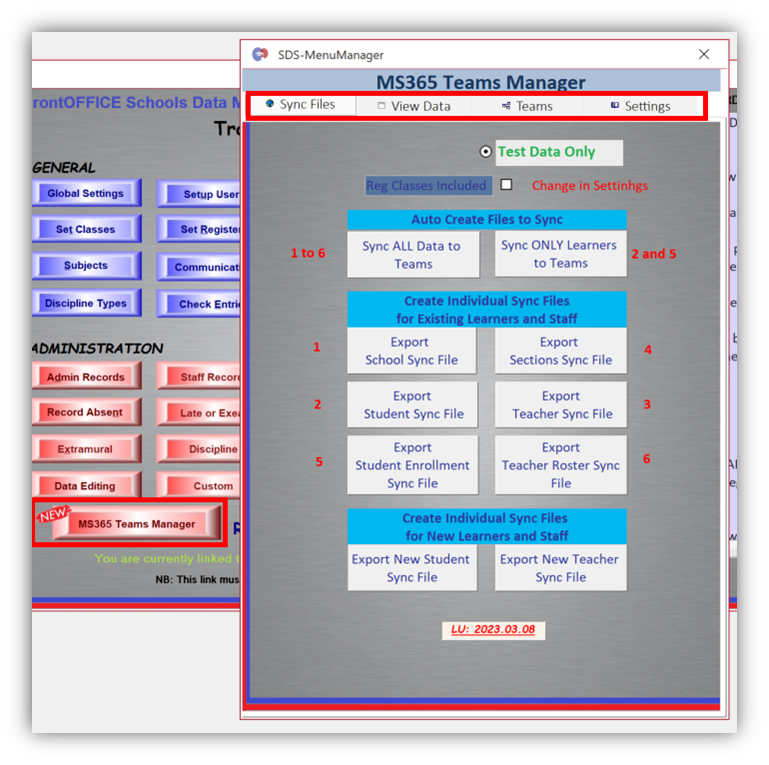
A number of you are waiting for the MS365 applications that we are doing for you to finalise. We are on it and will let you know as soon as we get to the next phase of this for you. More and more schools are joining so there are already application backlogs (we’re waiting for Microsoft) so please hang in there, as soon as the ball is back in our court we knock it up to the next phase.
If you have not yet given us the greenlight and are not on MS365 yet then let us know and we can start setting up the application for you. If you would like a demo on this then simply let us know and we will be happy to setup a date and time suitable for you.
You can ALSO run this in Test Mode in terms of creation of the data and then viewing how that data will reflect in terms of the teams you would be creating (ie. not limited to academic sets; could also be grades, whole school, admin staff, sports/co-curricular etc).
PD Circular No. 69_2023.pdf
This circular is also in the FrontOFFICE\Department\2023 folder. It is essentially just outlining the submission of your SASAMS data in terms of dates and procedure. It is absolutely the same story as every term including the submission of the db (SAMS database) along with supporting documents to the smartgov portal. This does not mean you do not have to do the Valistractor submission to DDD (and sign-off form), you must still do this too.
POPIA NSC
The last patch has added a section to the NSC report that requires a tick for these questions. We’ve made this nice and easy for you to deal with in FrontOFFICE.
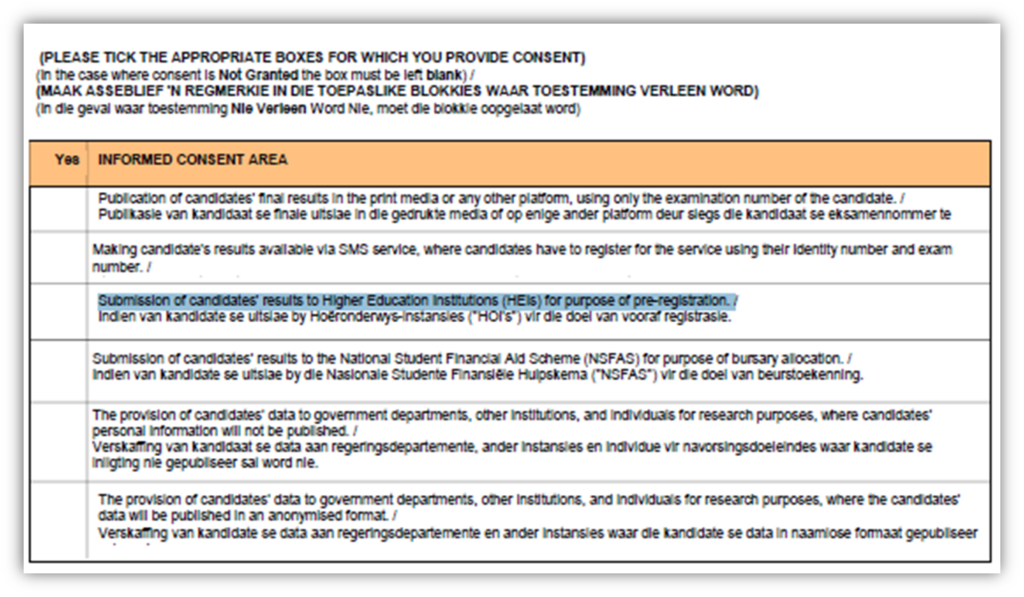
So we have added a section in FrontOFFICE whereby you can load the learners on a capture form and tick the columns so that they show ticks on the NSC form in the block above to print from FrontOFFICE:
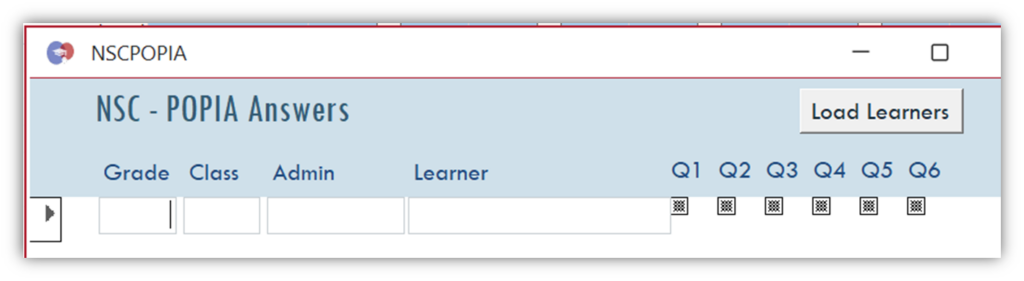
You will see the button in the same place that you print the NSC Reg form. Click ‘Load/Refresh Learners’ and it will pull up your learners. You may get leavers and arrivals during the year so if you come back to this section sometime later and you have changes to your student roll then click ‘Refresh Learners’ again (it won’t wipe out what you have done already don’t worry).
Note that SASAMS still has not added a fix to their system to make the report header come up on each learners NSC Reg form (should be in the ‘LearnerID’ header not report header on the report grouping if anyone from the SASAMS dev team is reading this) so we’ve done the modifications to FrontOFFICE so you can print from there.
New SMS Suppliers
We are in the process of building the integration with our new SMS Credit suppliers. It is not far from being done. We will run it our flagship school to start with and then release an install for the new one.
- It will mean that we won’t need to run the RemoteSMSConnector (the envelope) at the same time.
- SMS credits will be purchased via our portal (details provided later on).
- There will be analytical data that accompanies this eg. Did the parent receive the SMS? Did they open the SMS? This would be especially handy for the SMSBalances feature (no points for guessing why 😊).
- This will be for both FrontSMS (FrontOFFICE and SAMS2Front users) and for QuickSMS (SASAMS only users).
- Once this is in place, the SMSBalances, which is currently only in FrontSMS, will be added to QuickSMS.
So my suggestion is that start to reduce your balances with SMSGuys and or purchase in smaller bundles because when we switch over, you will need to use what is left of your SMSGuys’ remaining SMS and then purchase new SMS bundles from our Portal.
That’s all for now 😊.
Thank you all kindly.

Recent Comments