
Sandton, Gauteng, South Africa
Monday to Friday
Race Issue & 10+ Absentees
Contents: (click on a content header to go directly to that section)
Content:
- More than 10 days Reason Absent
- Patch22.1.0 Race Report (Indian) Issues
- Second and Third Name Learner Split (NEW!!!)
- 2023 LRC Total Revamps
- 5% Year Adjustment
Patch22.1.0 Race Report (Indian) Issues
Patch 22.1.0 has not fixed this report in SAMS. It did change the Indian/Asian classification in the learner module to separate classes.
Note there are no Indians on the screenshot of report, but there should be 7.
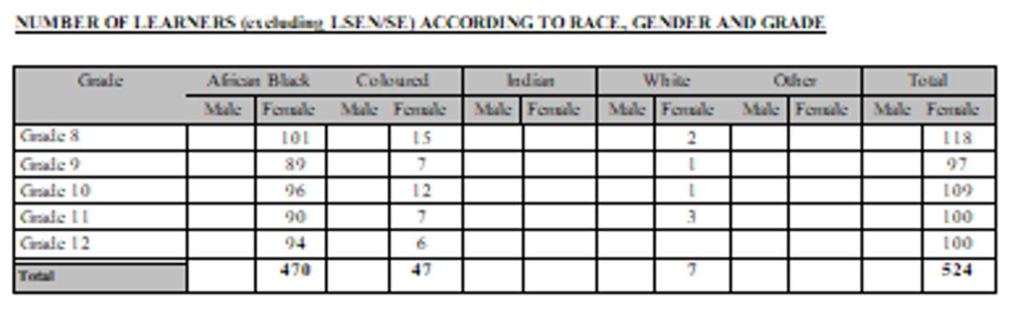
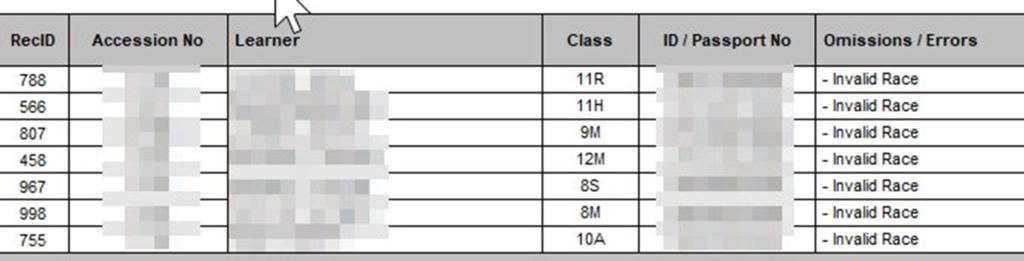
SAMS errors and Omissions module has also not been updated by patch 22.1.0 and this now reports the Indian classification as incorrect, despite having been selected correctly in the learner module.
More than 10 days Reason Absent
Then you also need to check the learners who are more than 10 days absent and go and give them a reason. See 3.3.2 in sams OR in FrontOFFICE go to:
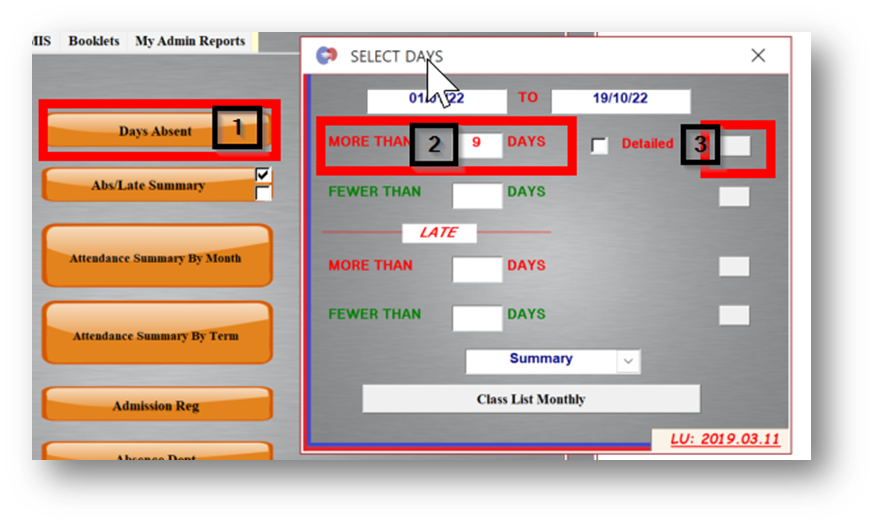
Click Days absent, then enter the days you want (less 1 ie. more than 9 days = 10+) then click the button on the far right. This will tell you learners that have been absent more than 10 days, not necessarily what reasons were given.
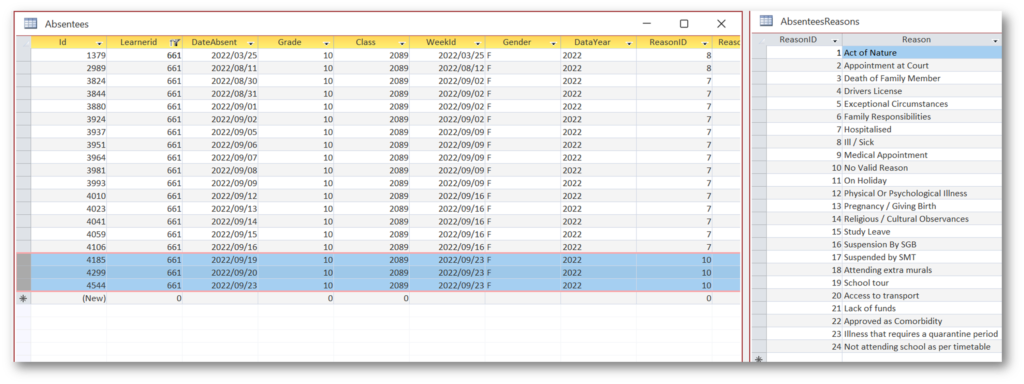
This is a look at example admin number 17011 (samsID 661) note that the highlighted days are – No Valid Reason. Which means that a reason was not captured for those days and since the learner was absent for more than 10 days the dept requires a reason (this parituclar table is just in the backend of SASAMS to demonstrate to you, you don’t need to be accessing it yourselves).
For that you can go in to Record Absent in FrontOFFICE:
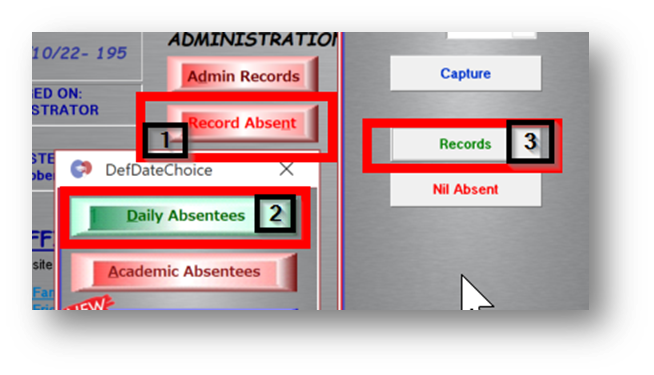
And cross-reference that information with the ones from your ‘more-than-10’ report printed above.
And then replace the ‘No Valid Reason’ with something from the drop down list:

Then sync to SAMS again.
Second and Third Name Learner Split
You may have noticed by now that we have added second and third name to the Admin section (Records and Data view).
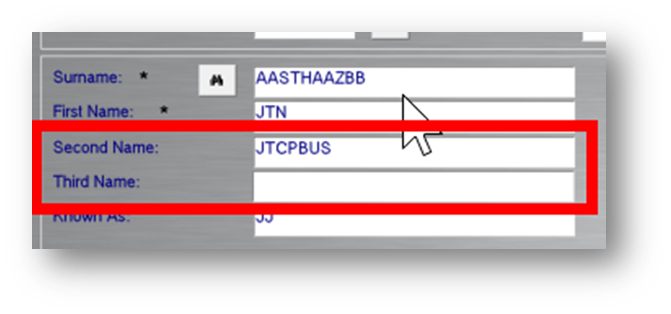
Please watch this video to see how to separate out the First Names into First, Second & Third:
Then it is very important that you let us know the following. Look at your LRCs (Learner Report Cards) for the end of the year and tell us if the learners’ name on the report is showing all of the names where a learner has more than 1 first name.
On the note of the LRCs – as per the post on our FB page, there are a number of schools that have the same LRC design that they have had for years and we could really spruce them up more for you with a full revamp. Full revamping of LRCs does fall under extra-design work in our SLF (Support Level Framework) as opposed to regular touch ups which fall under regular support (provided they are within deadlines) so we would quote you on that. We are crazy reasonable though 😊.
If want to have a look at doing this, ask your team at school in charge of LRC design to go design crazy and send it through to us. Challenge us 😊. We’re not scared! We’ll do mock ups with your data and send them through for your approval with a quote and upon acceptance we’ll update your system.
I always personally recommend having an LRC that is consistent throughout the year and shows all the terms for the year as they are entered. I’ve always felt this was most informative to parents in terms of progress through the year.
Another thing to think about is consistency in design through the phases. Even if the body of data is different, that the header and footer, along with the labelling, class and non-academic info are all the same design.
A smart thing to do, that some schools have done, for high schools in particular, is to have the phase 3 reports simply display the subjects like the phase 4 reports instead of trying to group. In other words, have geo and his simply show as subjects in the same way as the other subjects as opposed to showing as splits under SS. That way the 8-12 can share the exact same report design which makes life for all parties much easier and allows us all to focus on other aspects of the report. In this way, when a design request is made, it only needs to be done in one place. Note that for those schools that don’t show the splits anyway ie they have a subject called SS, this design principle would work for you too (ie. one report design for grade 7-12).
If you combine the above two ideas (which one of our schools has done in the high school for years) then actually you end up with one button for the whole year for all the grades (with the exception of a trials report for matrics) and therefore one single report design for all the grades for all the years. This ensures consistency in design throughout the year and across all the grades and therefore greatly improves the management of content in this regard.
We are also able to show the final SBA for the year on the LRC (automatically) which is now becoming a more popular thing to do.
The final promotion mark adjustment for learners at the end of the year is back up to 5%. I will send more info on this a bit later but just a heads up that this is ‘back in the mix’.
That is all for this article.
Regards
The FrontOFFICE Team
Recent Comments