
Sandton, Gauteng, South Africa
Monday to Friday
New Patch and Marksheet Fix Tools Summary
Contents: (click on a content header to go directly to that section)
Waiting on New Patch
The new patch was released for testing and on the weekend, it was discovered that it caused an issue in the schedules. There are some schools that are submitting early (as early as tomorrow) for various reasons (marking center etc). If the patch is not released by then, then you are going to have to produce your schedules on the current patch 22.1.0. This is as it was last year; print your schedules from FrontOFFICE or SASAMS before adjustments, make the recommendations and then in 12.7.18 in SASAMS, simply change results from NP to P and enter a ‘Deviation Comment’ (you can enter a Report Card comment too).

There is no direct mark adjustment to the actual mark itself, just an override of the result as it were. The only way you could be expected to ‘force’ a subjects mark up to 40 (or 30) is to adjust actual task marks and quite honestly I would be very surprised if this was expected of you.
For those that are submitting at the ‘normal’ (expected) time, then you are going to more than likely have been expected to run the new patch. There have neen issues with this and so therefore it is being delayed.
As I mentioned in our FB post, there are two variations of what is being expected in terms of adjustment floating around. We have had some schools say that their SEMs are saying that they will not directly change the marks, so as per the norm thus far, they will simply override the result in 12.7.18 and put in a deviation comment. Others are saying that the new patch will facilitate the mark itself changing to the required adjusted level (eg. 40 or 30, depending on what is needed for the P).
Testing with the initial release caused the schedules not to show marks for certain grades and for certain subjects in other grades.


So, this needs to be resolved first before it can be released. As mentioned in the FB post, it may well be that marks need to be resaved. We will keep you informed! (Always remember, if the patch is suddenly released then make a backup of your SASAMS data file before running). The one good thing about synching your data from FrontOFFICE (and the the batch excel marksheets) is that IF there any issues after the patch, you can always just sync to SAMS again and the data will be back. ANOTHER reason NOT to make changes to marks directly in SASAMS, rather change them on the marksheets, then put those marksheets into a separate folder (called say ‘Mark changes’) and then import those marksheets again. Once you ‘post to FO’ for your LRCs and sync to SAMS the marks will change in SASAMS.
Pre Fix and Post Fix for marksheets
Just to re-iterate what these fixes actually do. The FrontOFFICE term 4 batch excel marksheets, which the vast majority of you use, pull existing marks from terms 1 – 3 onto the marksheets as they are being created. This is so that it has all the data on it that it needs in order to calculate the final year mark (eg SBAs, Orals and PATS). Eg:
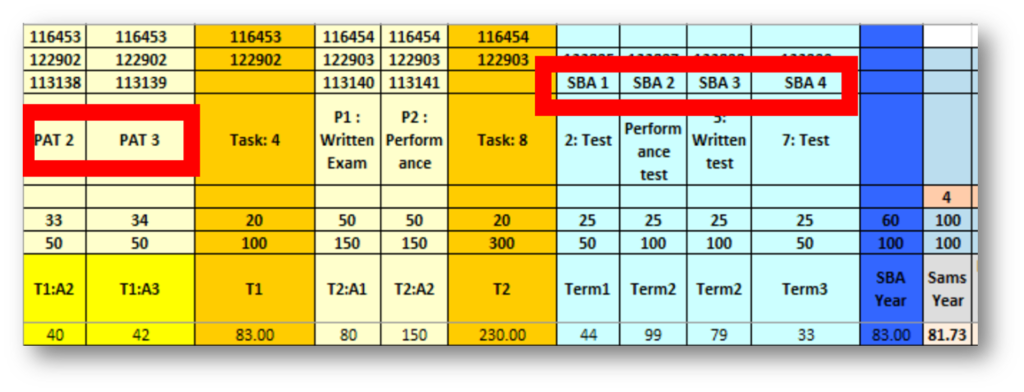
So those PAT marks and SBA marks came from the previous terms. Now in some cases, you are missing marks from those terms, either there is a -1 captured OR it has simply not been captured at all. When excel sees a -1, it counts it as exactly that towards the score (as opposed to skipping that task as it does in SASAMS). That means that the final mark (or SBA mark) is lower than it should be.
So we have created a tool (MarksheetFix2022-04-H-SbaPat.xlsb) that goes into all of your marksheets and forces the formula to skip any task where there is a -1 or a missing mark and to colour that cell in pink so that it is clearly marked. This means that the totals for those areas are now correct as they have skipped those tasks (blanks and -1s).

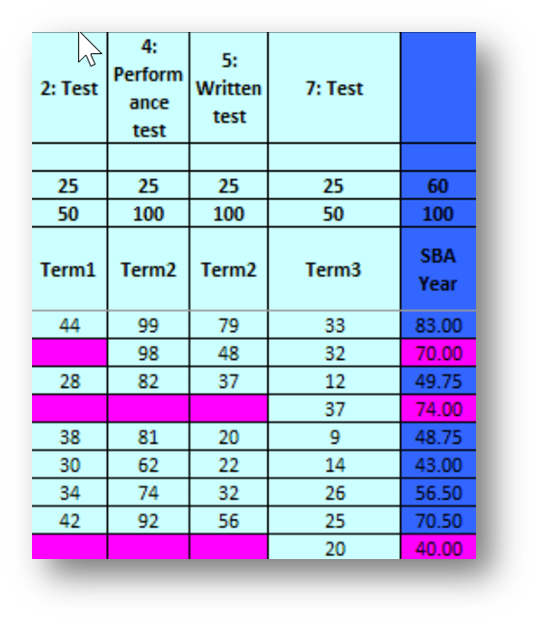
Now obviously, as this is done on the created marksheets (ie. before you are distributing them to your teachers) then the term4 columns that require marks would be blank and you don’t want the tool to forcing these tasks to be skipped, so you would land up with this:

This is NOT what you want. So we have made TWO fix tools.
- The Pre mark entry Fix: MarksheetFix2022-04-H-SbaPat.xlsb which targets all marks from previous terms on the term4 marksheets and does NOT do anything to the columns requiring term4 entry. This is therefore run on your marksheet folder BEFORE teachers enters marks ie. your created marksheets folder.
- The Post mark entry Fix: MarksheetFix2022-05-Minus1Final.xlsb which targets all the marks entered in term 4 and forced the marksheet to skip tasks done in term 4 (those missing Exam or Term 4 PATs etc.). This will ALSO do the previous terms’ marks on the term4 marksheet in case they were not done in the first place (although you would have expected your teacher to point out to you that there is a mark coloured in red that is causing the marks to be too low). This is there fun on your COMPLETED marksheets folder ie. the marksheets that the teachers have entered their marks onto. If you recreate a marksheet for any reason, then run the MarksheetFix2022-04-H-SbaPat.xlsb fix tool on it and then when the marks are re entered on to it, run the MarksheetFix2022-05-Minus1Final.xlsb on it.
The whole point here, is that you have DO NOT HAVE to enter mark changes into SASAMS directly. In fact, doing this, puts you in a tricky position because once you do that, you can’t do any more mark synching to SASAMS from FrontOFFICE. If you simply have teachers change marks on their marksheets, resend them to you (or let you know they have replaced their previous marksheet in the ‘Completed’ folder) then you can simply run the final fix on it (you can run it as many times as you want on the Completed folder) and then import and sync to SASAMS again. That way the teachers can stay working in their marksheets and the onus does not fall on the admin person to have to make a gazillion mark changes directly in SASAMS. Using the excel marksheets is FAR easier than having to manage SAMS on all your machines across your network for all the teachers. Excel distributes easily to all your staff and can be stored easily and used on the cloud on any platform and any device. It’s basically a no brainer.
Update 252 re run split tasks / activities
If you happened to have run the split tasks / activities button before update 252 the please rerun it and then sync to SAMS again (this does not affect the posting of marks to FrontOFFICE for LRCs).
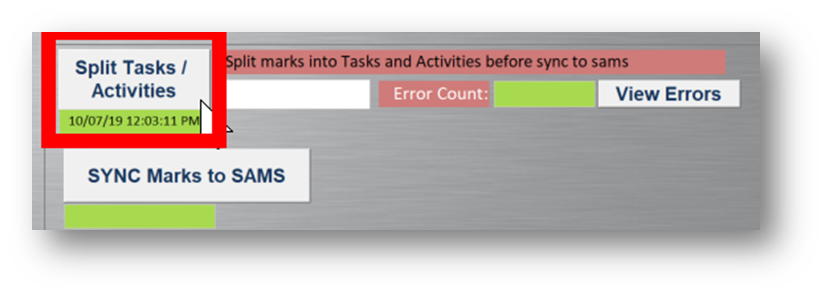
You may need to save marks again in 12.3.12 and so on.
On the note of saving marks all the time. We worked on tech over the weekend that saves the marksheets for all subjects within a grade in one shot. Unfortunately, it still requires further dev and testing so we are not releasing it this year, but it will be on the list for release in 2023, in fact, at that point, we may be able to (my money is on us) get it to do the whole lot in one shot upon sync.
That’s all for now.
Thank you all kindly.
Best Regards

Recent Comments