
Sandton, Gauteng, South Africa
Monday to Friday
2022_FEUpdater/FrontEmail
This email is for our FrontOFFICE premium and SAMS2Front schools only. Much of what you will see in this email, is about reduction in support levels and enabling our users (you’ll see what I mean below):
Contents: (click on a content header to go directly to that section)
LRCs Term3
This one is fairly straight forward. This is the final call (ding ding ding) for LRC (Learner Report Card) alterations required for term3 as we head to 2 weeks before the end of term3. Please check your designs and let us know what adjustments need to be made. If changes are introduced within the final two weeks they may incur a surcharge.
FrontEmail Updates
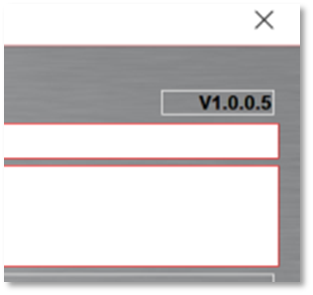
We have released version 1.0.0.5 of the FrontEmail system (you can see what yours is if you open it and look at the switchboard you can see the version number:
We have added a control date for the automated email section:

Ordinarily, you had to run the absentees button for instance, on the day the absentees were being done, whereas now you can set the date using the control date and the absentees will be calculated for the date as set on the control.
This also applies to the late discipline and merit/demerit buttons. Note that the merit/demerit button calculates however many behaviour records have been entered on the chosen date. those could therefore be merit records demerit records or indeed records that don’t carry any merit or demerit values. The auto personalised message which is built into the system, will pick up the reason entered for that behaviour record.
The discipline button is calculating the number of records whereby a discipline action is coming up the following day (obviously this will be a Monday if the current day is a Friday).
If you your auto personalised message customised for you, you will need to contact us so that we can show you how to do this.
AutoUpdate FrontOFFICE on your network
When we refer to updating FrontOFFICE on your network, what we are talking about here is when you update the server and then any other computer in the school once to update they update from the server. You could say keeping your client terminals up to date. I’m of this in your front of the manuals and walk through’s sub folder and the technical folder within that, the file is called front end flow.pdf.

FrontOFFICE has now partnered with a system called FEupdater (where if FE stands for front end if course). Order cost $475 but as partners of FEUpdater we can get the system for $100 per licence as a once off fee (only one installation on the school site is needed).
Why would you want this instead of the system that is currently in plac? Well the simple answer is that it would keep FrontOFFICE automatically up to date across the entire network as well as enable you to install front office by simply emailing a new machine a link and that link being clicked on in the e-mail of the new machine.
It will also effectively distribute your previous years’ FrontOFFICE’s (Front2021, Front2020 etc.) PLUS all of our other applications like FrontEmail, FrontSMS, FrontXL, Subject packages and so on to all of those machines (or not, if not wanted eg accounts machines may only want FrontOFFICE).
For those of you with only a few users, say 2 – 5 then you may find this somewhat unnecessary (although even then it will still help). For those of you running a thin client system this will still be beneficial to you and can be implemented and will simplify things.
For those of you who have (or would like) FrontOFFICE in every classroom then I would highly recommend this as the way to go.
Below is a full list of the features (note that you would have the enterprise which is the $475 knocked down to $100 – once-off)

As I say, this is going to completely automate the creation, distribution, management and maintenance of FrontOFFICE on your network. The only thing that remains the same for now is receiving updates from us on the master machine (main FrontOFFICE admin machine) but that part is straight forward (most folks just run the auto checker first thing in the morning) and will ultimately also be auto managed.
If you are interested, then let us know.
Virtual Machine for Support
We have mentioned this before, a few schools have done this which helps tremendously. Basically you set up a Virtual machine on your server that acts as a client terminal (a computer on your network) just for us to support you on. For one thing, when supporting you live, we do not have to take over your administrator’s computer (which can sometimes run longer than expected) as we can log onto the VM and we can operate FrontOFFICE etc from there without disturbing you working. We can also log on overnight if there is something we want to resolve or test after hours AND you don’t have to leave a machine on and running for us as many of you currently do.
We can also setup up periphery software for you so for a start, something like the FEUpdater can be installed at that level.
The specs recommended for this (technical folks will know what we mean here but basically this does not mean you have to buy anything, it is all virtual, none of it is physical) are:
Win10 (preferably 11)
8GB of Ram and min 60GB storage.
Office 2019 or O365 installed.
Access to the VM will be via our corporate copy of Teamviewer (FOSupport), which will only allow our support staff to have access. A user needs to be created on the VM called FOSupport that has admin rights on the VM and will also need network access to the iSOFT on server (folder on your server that stores your data files for FrontOFFICE) as well as the network folder that has the SASAMS data on it.
It goes without saying that as a trusted 3rd party service provider, all the information that is of a proprietary nature belongs to you and will be handled in the strictest pway and in terms of the POPI act.
If you have any questions about this, please contact us.
LURITS Feedback Files
If you go to the department with your SASAMS data file they may tell you that they cant process the feedback files for you because of your 3rd party provider (which is not entirely true but ok) but they will also tell you that FrontOFFICE knows what to do and put those feedback files on to your CD.
If your parituclar liaison does not know about FrontOFFICE then just ask them to give you the feedback files. The good thing is that
We will decrypt them, import them into your system (via an update we send to you specifically) and they will go across to SAMS in your next sync.
Telemetry Updates 154 and 155
Updates 154 and 155 add some telemetary updates we mentioned in a previous email. It is already giving us information about your logging in and actions in FrontOFFICE.
For example:
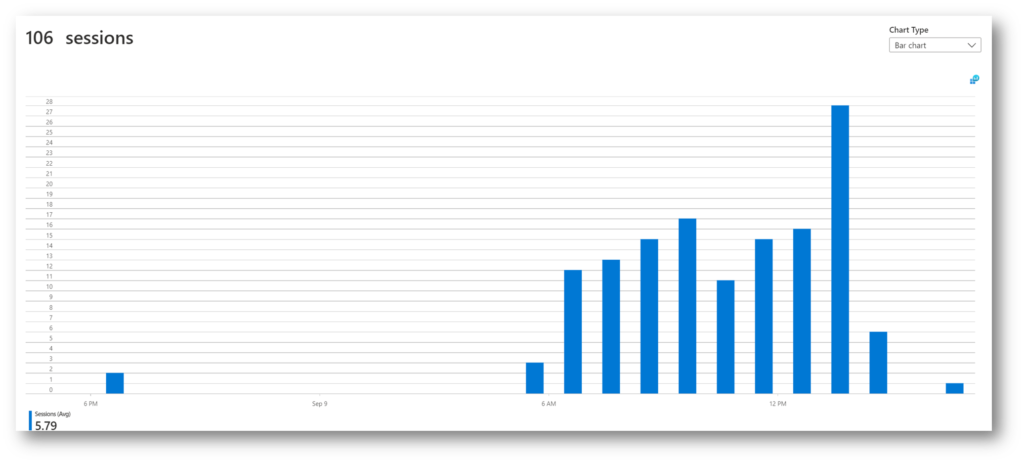
This was taken from Friday (obviously only those that had run update 154 and 155 would be a part of this aggregated data). So, on a simple surface level we could immediately gauge high usage parts of the day (and over time parts of the week, month, year and so on).
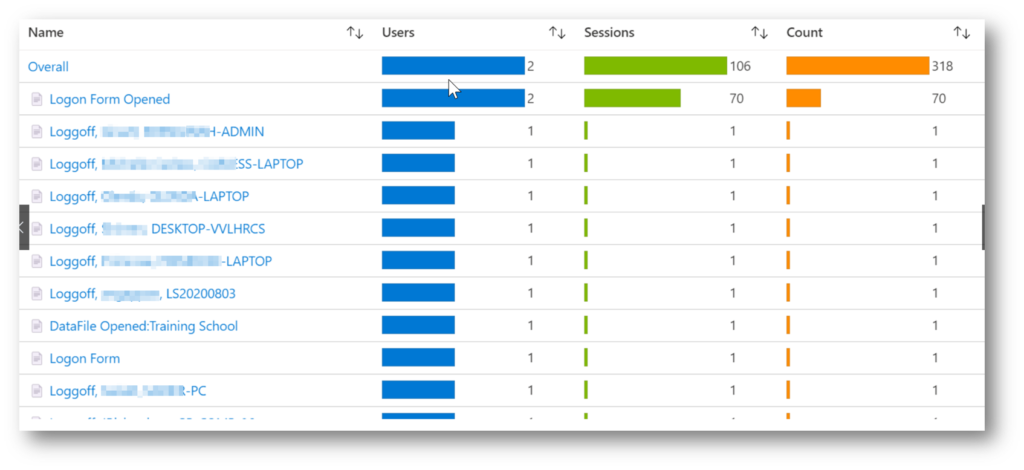
We can tell whether who has logged on when and what the name of the computer is (so it can be identified on your network) and if it is a laptop or a desktop and so on.
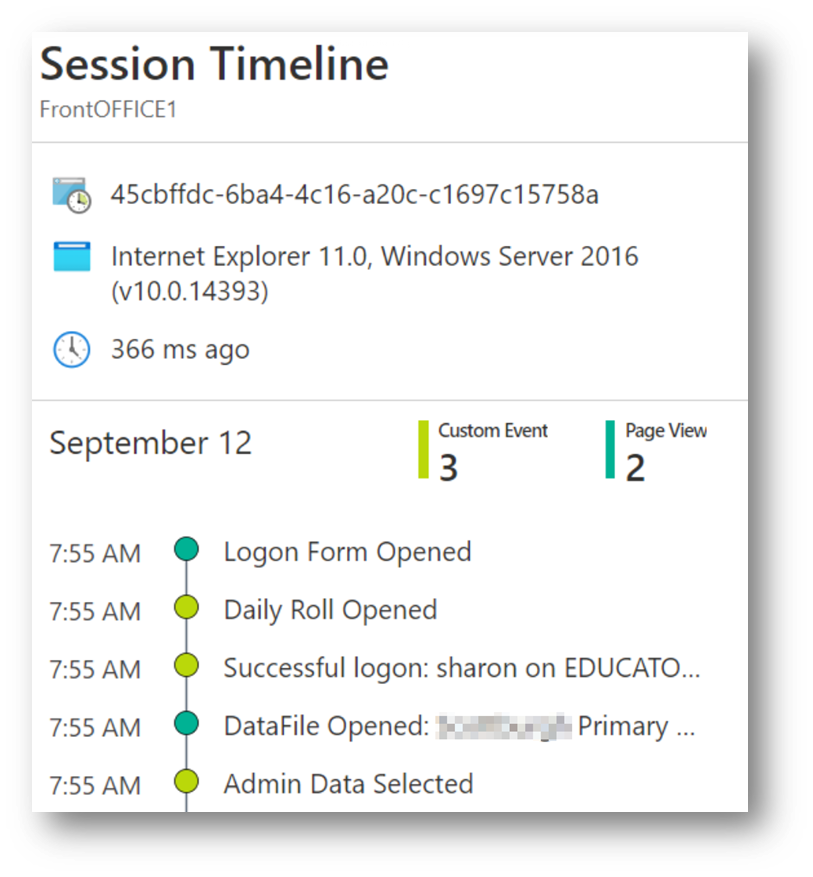
We can drill down into that and follow the timeline (so we could identify when a systematic error occurred for instance) and so on. We can also tell other elements like version of windows and update level so for instance we can already tell from the small data sample that we have that many of you need to update your windows. As an aside folks, Windows updates are important for security. The longer you stay out of date, the greater the risk of attack becomes.
As we keep banging on about. Data data data. Your data must be informing you. That is our goal and single-minded mission. FrontOFFICE Data Management Hub. Enter once, use many times. One stop shops are, and will, ultimately die as specialists do special things. We will integrate, openly but also prudently, so that you can operate centrally but enjoy expert systems.
All of this in in lieu (as with the VM section above), as we have mentioned before, is to reduce support levels which saves us all time and money and frees up resource to develop.
Join and subscribe to our YouTube channel
Our support and explanatory videos will always be embedded in our emails and user-manual sources (and increasingly our blog posts on our website) but it also helps to subscribe to our FrontOFFICE Schools Support YouTube channel.
Admittedly we have not posted a huge amount of content in recent times but we will be ramping this up in due course.
Again, aimed at support reduction and enabling users at a scalable level.
LO Grade 12 Term3
We have come across a discrepancy between the prescribed method weighting for term3 grade 12 LO:
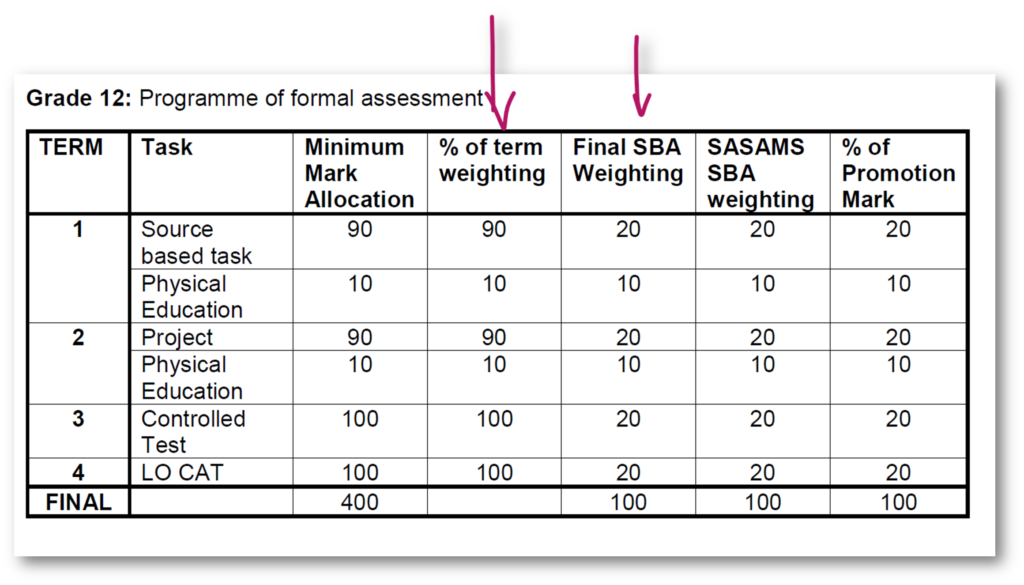
And the SAMS mark profile in 12.3.11:
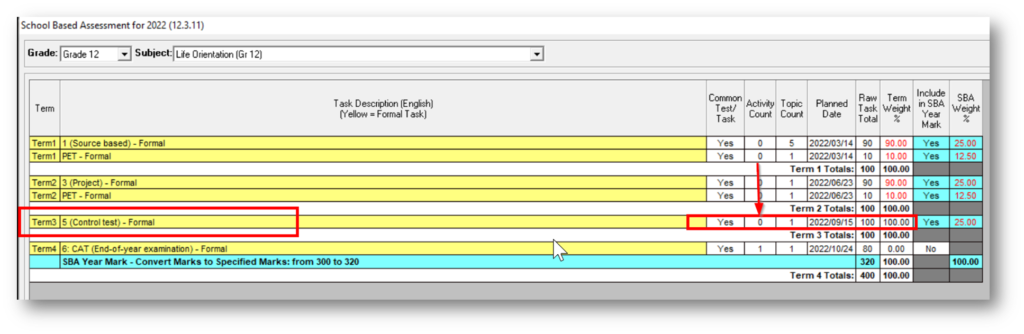
There are no activities in that task either to denote the 90/10 split.
The fairly simple thing to do here is go into that task, and add two activites for the 90/10 split. That would then appear on the marksheets as the two activites within that task thereby representing the split.
Of course it is not impossible that the department could release a patch which adjusts this. Unlikely, but not impossible. Personally, if it were me, I would simply add the activities.
Term 3 Marksheets
By now, the vast majority of you have replaced the marksheets in your C:\iSOFT\Marksheets folder with the ones from the FrontOFFICE cloud marksheets folder and run the marksheets for term3. If not then please do so. Some have already started importing marks.
The speeds and operability should be a lot faster and better this term. Backwards compatibility will not be a problem either as everyone is up to the same level now.
Of course, let us know if you are having any issues.
That’s all for now.
Thank you all kindly.
Best Regards

Recent Comments