
Sandton, Gauteng, South Africa
Monday to Friday
2022 – Term4 Marksheets Version 6
Contents: (click on a content header to go directly to that section)
Term4 Marksheets Version 6
We have released a marksheet version 6 for term4. IF you have already run the marksheets using the previous versions, don’t worry, you don’t need to rerun them. We simply met our match in terms of columns count for those wonderful little phase 1s (such formidable opponents) as they had like 40 plus columns and so we added for that. For those that did run into that problem, we have adjusted on the fly, for those that are still to run, you will be fine now but you MUST use MarksheetTemplatesV6.xlsx AND you MUST be up to update 221 on FrontOFFICE:
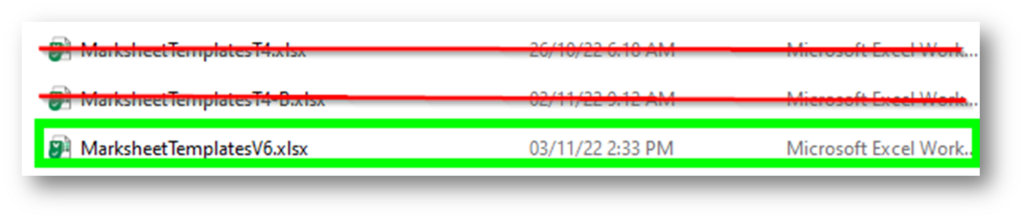
For High Schools… as you were 😊 (ie. this does not concern you).
If you are a combined school. Simply run using MarksheetTemplatesV6.xlsx (as picture above) for all and it will figure out what it needs to do because there is now a Template7 that grades R-7 will use:

So if you are a school that does some custom formulae at the template level (or custom column headers) then for primary school you need to do that on Template7.
Speaking of custom headers, after having run update 221 you can now customise/pre enter the following on the headings on the marksheet:

If you do not change those then they will default to what they are on the Marksheet Manager. It’s fairly self explanatory but basically the RDs (blue blocks) go into those RD columns, the Headings go into the Mark Heading columns (Green Blocks) and the weights (pink block) go into the pink blocks.
Note that you can change these values per grade (or phase) if you simply enter them, create the marksheets for the grade(s) you want with those settings, and then change the settings and create the marksheets for the grade(s) that you might want.
Just to refresh your mind regarding the mark column headings and the content thereof:
- the ‘SAMS Year’ mark column is a calculation of the SAMS mark, so it will match exactly what is in SAMS.
- the ‘Other Mark’ mark column is a blank column into which you can put anything you like (a mark of course, not text).
- The ‘Report Mark’ mark column is a combination of those two columns. The default weighting is 100% SAMS mark and 0% Other mark so the Report mark, by default, matches the SAMS mark. You could, if you wanted, change this on the template to say 50/50.
- The VAST majority of you will not be using any sort of combination between ‘Class/SAMS mark and Other/Exam mark’. It is only for those that are combining some sort of internal mark WITH the final SAMS mark for your OWN Report Mark on your LRCs.
Here is an example of how one might use it:

In this case, the user has taken the SAMS Mark (which is the final promotion mark) and combined it with say some form of internal mark, according to a 75/25 weighting and are using any or all of those marks on their LRCs in which ever way they choose to dislay them (hence the name; Report Display Mark).
Again, note that the SAMS mark IS the official final promotion mark and IS the mark that the inspector will sign off on, on the schedules, thus determining if the child will pass or fail. The other marks, are at your discretion.
You can also enter a formula of the ‘Other mark’ (green column) and you can also enter your own formula of the ‘Report Mark’ (blue column). That would be done directly on the templates.
Term4 LRC Changes Deadline
Tomorrow (4 November) is the deadline for getting LRC changes in to us. Please get them in if you have not. If there are last minute.com change requests made then as you know this may incur a charge as we are of course busy come this time of the year and so it potentially forces us to work at silly o’clock.
That’s all for now.
Thank you all kindly.
Best Regards

Recent Comments